


Introduction
Since the beginning of 2020, the way employees communicate has changed vastly, and Teams has likely played a major role in keeping everyone connected and collaborating. Many businesses looked to Teams for change and found they were able to integrate many of their daily activities into one convenient central hub. One of those many features was Teams Phone; Microsoft’s own cloud-based VoIP system replacing the need for onsite or traditional VoIP phone systems, but what are the benefits of this?
Read on to find out what the difference is between Teams and traditional VoIP? Which one will work best for your business? And why you need to consider switching?
Traditional VoIP Telephony
VoIP or Voice over Internet Protocol describes the method used to place and receive calls over the internet. It is used to replace the traditional telephony system businesses use.
VoIP combines traditional and modern telephone systems, converting analogue signals into digital signals and transmitting them over the internet. It requires a stable high-speed internet connection. In addition to being cheaper than landline calls, VoIP calls can also be integrated into your phone service wherever you work. The traditional VoIP telephone system has many benefits, including the fact that it is fully scalable.
Teams Phone
However, now Microsoft has come along and built on the traditional VoIP system of telephony creating Teams Phone. As opposed to other VoIPs, Teams Phone is truly a digital and cloud-based system, which means no analogue signals are needed, no servers are required, and it can also be connected back to the traditional phone network.
Additionally, there is no need to have a physical handset with Teams Phone. Using Microsoft Teams, you can access your phone calls from anywhere, as long as you are connected to the internet. If you want a desk phone, you may connect one through a Microsoft-certified device.
Teams Phone offers a wide range of call features are at your fingertips; including auto-attendant, cloud voicemail, call queues, direct routing, and auto-conferencing. All designed to provide your business with a professional phone system.
Benefits of Microsoft Teams Phone
Low Costs -As with traditional VoIP systems, Teams is lower cost which makes it a very cost-effective option for your business. Additionally, Teams is scalable and flexible, which means it can be tailored to your specific business needs, ensuring you only pay for what you need. And with the power to port your existing telephone numbers or request new ones, Teams is a great money-saving tool.
Seamless Integration – A central, integrated hub for all your business communications. Through Teams and 365, you can access and have all your communications, coordination, and collaboration channels in one place. Without having to use different software, you will be able to increase productivity. The seamless integration with the rest of the features creates a unified and efficient experience for your organization.
Spam Detection – Teams Phone now has a feature to detect potentially spam calls automatically. This functionally evaluates incoming calls and flags potentially spam ones as ‘spam likely.’
High Level Security – As opposed to traditional VoIP, a phone system managed by Microsoft allows for a high level of security, because the users are protected by the Microsoft Cloud.
In Summary
Traditional VoIP can be a viable solution for businesses without Office 365 or Teams, but Teams Phone offers a more sophisticated solution, seamlessly integrating into all your other Teams and 365 features. This will enable you to create a truly collaborative and streamlined team hub that will reduce costs and increase productivity. With many companies relying on Teams for all their other business needs, moving your VoIP to Teams Phone is a must for businesses.
Managing data and IT solutions in-house can be challenging and expensive. That's why many organizations turn to MSPs. But what is an MSP?
Digitalization has forced businesses to alter their operations and make IT a huge part of their day-to-day affairs. Still, some owners can’t cope with the change effectively, so they hire a managed service provider, or MSP, to take care of the work.
But what exactly is an MSP?
Simply put, this is a third-party company you can collaborate with to help manage parts of your business, such as your IT or cloud needs. It provides technology and expertise to boost your organization’s scalability.
Working with MSPs can have tremendous benefits for your enterprise.
For instance, their profound understanding of cutting-edge technology can help you improve performance, operations, and security while reducing overheads. In addition, they can offer several creative solutions to help you navigate the evolving landscape of the big data world.
But the strongest suit of any MSP is usually their ability to deliver tailor-made solutions that fit your company perfectly.
Their expertise allows them to analyze your business thoroughly and render their services according to your strengths and weaknesses. Plus, they consider the regulatory environment and compliance to safeguard against legal issues.
Another great thing about MSPs is that they can support your business even after hours.
They offer support measures and staff to maintain and protect your organization 24/7. MSPs can even tap into your system to resolve issues and deploy updates without going to your office using remote technology.
Overall, MSPs can help take your company to the next level. However, you can’t work with just any service provider. You need to select the right team for your enterprise, and this article will show you how.
Choosing an MSP – What to Look For

Hiring an MSP shouldn’t be a hasty decision. Instead, you want to take a variety of factors into account.
Here are the six important factors to keep in mind:
Factor #1: The MSP’s Track Record
Prospective MSPs should provide case studies and success stories to demonstrate they’re suitable for your business. You can also look for testimonials, references, and endorsements. These will help you determine if the team has been operating for a while and if their reputation is solid.
Working with a reputable MSP can give you peace of mind with the knowledge that your system will be appropriately managed. Moreover, you’ll feel confident that the MSP will do all in its power to preserve its name.
The MSP’s success hinges on yours in some respect, which is why they’ll view you as a valuable partner.
Factor #2: The Range of Services They Provide
MSPs offer a wide array of services. Some teams are full-service companies, meaning they address your cloud and IT needs comprehensively. In contrast, others may help you with different pieces of your tech puzzle.
Therefore, consider your needs carefully and ensure your MSP can meet them.
Regardless of your service package, the MSP needs to keep up with the latest technology trends. Otherwise, numerous security issues may compromise your company and allow the competition to prevail over you.
Factor #3: Support
As previously indicated, MSPs can work round the clock to ensure your business is compliant and maintained adequately. However, they should also increase their support quickly and adjust staff schedules as your company grows.
That’s why you should consider an MSP that offers training for your employees.
It lets them understand the necessary changes and encourages them to train other team members as they join your business. But if your employees are too busy, you can instruct the MSP to carry out all the training.
Factor #4: Response Time
Your network can go down for any number of reasons, preventing your employees from working and your clients from reaching you. This situation can even cripple your reputation, customer base, and revenue. In the worst-case scenario, it can even make you shut down your business.
Fortunately, a high-quality MSP can help you avoid this scenario. They can identify threats to your system and neutralize them before hurting your company.
Moreover, if an incident takes place, they should respond immediately. They need to mitigate the risks as soon as possible to keep your organization from crumbling.
Factor#5: Security & Backup
One of the most important duties your MSP should perform is to shield your data from cyberattacks. This is critical to protecting your company and customers. Besides, safe data storage might be mandatory in your industry, which is why your IT department could use all the help they can get.
Once you work with an MSP, they should recommend robust security solutions and endpoint protection to combat harmful software. And throughout their engagement, they should consider compliance to help prevent legal issues.
Another major part of their mission should be the implementation of backup software. It enables you to retrieve your data in case of a breach. Such implementation may involve automation, a restoration plan, and a no-downtime policy.
With a failproof backup and security strategy in place, you should be able to run your company more confidently. The risk of downtime will be drastically lower, allowing you to operate smoothly, maintain high sales, retain customers, and preserve your brand.
Factor #6: Guidance on Workflow Options
Your MSP shouldn’t just deal with cybersecurity – they should also suggest adopting the best practices across the entire tech landscape.
For example, they should advise you on various CRM solutions and project management applications. They should also help you revamp your approach to workflow and data to create efficiency in all departments.
The fact is, you can yield tremendous results from their guidance. Your team can work faster, collaborate in real-time, and be more tech-savvy.
Recruit your MSP Carefully
While price is important when selecting an MSP, it pales in comparison to all the factors listed above. Be sure they’re a perfect fit for your enterprise, even if you need to pay more.
With high expertise, customized services, and an understanding of threats, a reputable team can help you stay ahead of your competitors.
If you need more assistance choosing your MSP, get in touch with our experienced team. Let’s schedule a quick chat and figure out the ideal MSP for your company.
Article used with permission from The Technology Press.

Introduction
Among the plethora of business applications and tools which have migrated to the cloud, the latest addition is an entire Operating System – Microsoft’s Windows 365 – which runs solely from the cloud. This new service brings with it very interesting implications, particularly the benefits it offers to both individuals and business users.
What is Windows 365?
Windows 365 is Microsoft’s brand new OS which runs exclusively in the cloud. The main purpose of this cloud OS is to allow you to connect your Windows 10 or 11 device from anywhere, no matter which device you use: from Mac and iPad to Linux, Android or a Windows PC. The great thing is you can enjoy all the powerful applications, data or settings remotely from any location which you otherwise use or access from your home or work PC.
Windows 365 has taken direct inspiration from Azure virtual desktops, and the key idea behind it is to simplify the virtual desktop experience, allowing users to control all aspects of their home or work PC from the cloud in a very easy, intuitive and straightforward way. All you need is an HTML5 browser to access your work or home PC from anywhere.
Benefits of Windows 365
Unprecedented scalability and flexibility
Remotely configure the file size, CPU and RAM usage of your PC as per your needs, thanks to virtualised sessions on Microsoft’s secure servers. This versatility will offer numerous benefits to home and office workers, and particularly, IT departments, who can expand or scale back their processing and storage capacity requirements on an ongoing basis.
Secure storage in the cloud
Windows 365 supports the principles of Zero Trust, which integrates the maximum security measures and guarantees when using any cloud-based service. All current security solutions offered by Azure can be availed by Windows 365 users, as well as multi-factor authentication for the best possible security assurance.
The migration to an in-the-cloud OS means organisations can stay safe from cyber security breaches, which otherwise is easy to fall victim to when data and resources are hosted on local computers.
Simplicity and ease-of-use
Super-easy management and an instant start-up or boot-up enables users to pick up exactly where they left off on their home of office workstation. This means IT departments can continue managing and deploying the configuration of any workstation no matter where they are. This also makes W365 very effective for onboarding new employees remotely.
Typical business use case and how we can help
Where a normal user would require a fairly powerful PC for, say, graphic intensive tasks or server management – with Windows 365, all you need to do is sign in and enjoy the same great features of a powerful PC or hardware, without actually investing in it.
Emerge Digital is a certified Microsoft and Azure partner – our team can help you manage deployment of Windows 365 cloud PCs from start to finish, including everything from configuration and set up to ongoing support whenever you need it.
To discover more about how Windows 365 can help your business, get in touch today!

Introduction
Microsoft’s latest operating system is starting to take the world by storm. But before jumping ship and upgrading to the new OS, better read this first.
It’s finally here.
After six years, Microsoft has just released the latest version of its operating system — Windows 11.
At a time when computers and technology play a more central role in human lives, tech companies are scrambling to deliver the best user experience possible to capture the ever-expanding market.
Microsoft’s answer to the growing demand for better technology for home and business use is Windows 11.
Microsoft dubs their latest operating system as the “Windows that brings you closer to what you love.” But are they actually able to achieve that?
I know you have a lot more burning questions about this latest OS from Microsoft. So without further ado, let’s jump right into answering the five biggest questions you may have about the newest version of Windows.
The Five Questions About Windows 11
Question #1 – What’s the difference between Windows 10 and 11?
Windows 11 gets a significant boost in performance, functionality, and style compared to Windows 10. Here’s a small rundown of the critical upgrades Microsoft made for its latest OS:
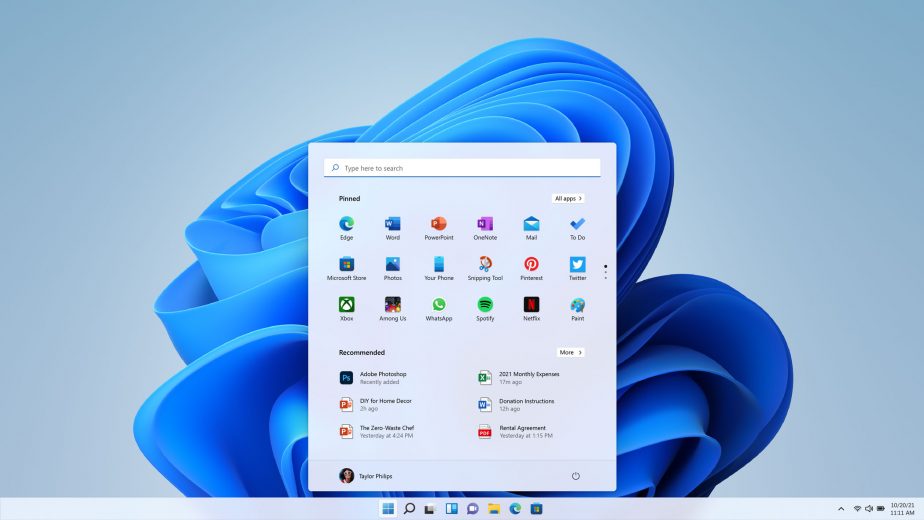
- Windows gets a makeover: If you’ve used Apple before, you might see the similarities between the design of the macOS and the latest Windows model. Windows now also sport tightly rounded corners and the taskbar icons are permanently centered. But at least the ever-handy Start button is here to stay.
- Streamlined Productivity Functions: There are many small but significant upgrades that Microsoft did for Windows 11. For one, your PC will now remember the last layout of your choice when docking. Each of your virtual desktops can also have a different background. Also, widgets are back like never before. And Windows 11 features a Snap Layout function that lets users choose from a variety of layout options at the click of a button.
- New and Improved Teams: With hybrid work becoming the new normal around the world. Teams entered the spotlight. Because of this, Microsoft made sure to include reasonable upgrades to the application. For example, Teams is now integrated into the operating system, making it easier to communicate with family, friends, and colleagues.
- Better Gaming Experience: Microsoft made sure to think about not just business people and workers when designing the new Windows 11. Gamers will love the fact that playing games on Windows is made even better, with Xbox Game pass and Cloud gaming supported on the Xbox app in Windows 11.
- Android Apps on Your PC: Aside from offering better compatibility with the Xbox, Microsoft has successfully integrated Android apps on your PC using Windows 11. But here’s the catch: We’re not yet sure if these Android apps would work optimally on PC.
Question #2 – Do I need to make hardware chances to switch to Windows 11?
It depends. Here’s an essential checklist of what you need to have to run Windows 11 smoothly:
- At least a 1GHz dual-core processor
- 4 GB of RAM
- At least 64 GB of storage
- A graphics card compatible with DirectX 12 or later, with a WDDM 2.0 driver
- 720p display, at least 9” diagonal size, with 8 bits per colour channel
- TPM version 2.0
- UEFI, Secure Boot capable firmware
If your PC or laptop covers or does more than what’s listed above, then you can safely upgrade to Windows 11, worry-free.
On the other hand, you might have to make some hardware upgrades or buy a new device altogether if your current one does not meet the minimum requirements. Here at Emerge Digital, we can supply you with a range of Windows 11 ready devices – simply get in touch and we’ll help provide the best device for your needs.
Question #3 – Is the Microsoft Office suite available on Windows 11?
No. You have to pay for a Microsoft Office subscription first.
But if you have an existing subscription to Microsoft 365, then you’re all set. You just need to install the Office suite after upgrading.
Note that support for older versions of Office (2010 and below) has been discontinued since last year. So if you’re still using that, I suggest you make necessary changes to avoid making yourself vulnerable to security risks.
Question #4 – How can I switch from Windows 10 to 11?
If you’re looking to upgrade from Windows 10 to 11, you have nothing to worry about.
You just need to go to the Windows Update section of your Settings and click “Check for Updates.” Windows 11 will just be there available in the upgrade section.
Click the “Download and Install” button, and that’s it.
Question #5 – Do I really need to switch to Windows 11?
No. If your computer is not compatible or can’t run Windows 11, you don’t have to upgrade.
On the other hand, if your PC is compatible with Windows 11 but you find the upgrades unnecessary for your current workflow, there’s nothing wrong with staying with Windows 10.
Even Microsoft said that Windows 10 is still the right choice for those who aren’t ready to transition to a new operating system. In fact, they made sure of this by scheduling an update for Windows 10 later this year. At the same time, the company will continue supporting Windows 10 until October 14, 2025.
This gives you about four years to think about upgrading to Windows 11 or switching operating systems altogether.
Technology that works for you
The new era of Windows has finally arrived.
Microsoft made it a point to make their latest OS worth it for old and new Windows users. And with these new updates, it is clear that the company has made an effort to find out its users’ pain points and address them.
But despite these new features, you have to understand one thing:
Technology is just a tool used to increase our everyday productivity and efficiency.
That means you don’t need to jump ship to Windows 11 if you’re not ready to do so outright. Technology is only as effective as how much you use it. So if you’re already a master of Windows 10 and it makes you 100% productive, then change is unnecessary.
Now, suppose you’re seriously thinking about making the switch to Windows 11. But you want to know more about its hardware compatibility and security updates. In that case, you need an IT service provider that’s willing to talk you through it.
If you need any help in fully understanding the pros and cons of switching, schedule a no-obligation conversation with our team today.
Article used with permission from The Technology Press.
Introduction
How a cloud migration strengthened data compliance at Thompson Taraz
The Client
Thompson Taraz is one of the UK’s leading fund services groups and has been supporting real asset fund managers for over 30 years. Fund services provided by Thompson Taraz include Full Scope Authorised Investment Fund Management and Depositary services as well as Custody and Nominee shareholder services and Fund Administration.
Thompson Taraz’s focus is on being adaptive and flexible to their clients needs and is in a period of growth. There is an increasing focus on new business development within the company and a high level of internal skill has driven specialisations. By drawing on a wealth of accounting, auditing and business advisory specialists, Thompson Taraz not only complies with financial regulations but adds value to their clients’ strategies including Property, Infrastructure, Debt, Venture Capital, Private Equity and Energy.
The Challenge
Thompson Taraz had a robust but aging on-premise infrastructure consisting of two physical host servers and virtualised storage, which was broken into eight virtual servers, each performing a different task (running their line of business applications, storing their files, running their network etc.).
The business is regulated by the UK Financial Conduct Authority (FCA), and information security is a top priority. In recent years, the FCA – and the Financial Services industry in general – has started to recognise cloud hosting as a more secure option to on-premise solutions.
To keep up with industry recommendations, and to enable better collaboration with their employees and customers, a migration to the cloud – including Microsoft 365 Services and Azure Cloud Services – was added to the business’s roadmap as part of our Digital Business Strategy process. However, when the COVID-19 pandemic hit, plans for this migration were fast-tracked because remote working proved difficult on their existing infrastructure.
The Solution
We broke down the migration into three key phases, which allowed for a gradual changeover for the different parts of their infrastructure.
Phase One
The first phase involved the introduction of a hybrid cloud setup to start off the transition. We implemented resilient cloud servers to run the network, which were hosted in Azure and our data centre. We also developed a plan for the deployment of SharePoint, OneDrive and Teams based on Thompson Taraz’s business requirements.
Phase Two
In the second part of the project, we created a SharePoint and Teams environment based on the agreed design. We also deployed and configured the system and information security features of the Microsoft 365 Business Premium license to fit with the industry’s strict requirements. In preparation for the data migration, we implemented a 365 backup solution to protect data.
Phase Three
The final stage of the project involved the migration of their line of business apps to a cloud hosting platform, as well as data migration from the legacy file servers to SharePoint. Backup systems and policies were tested, and a second cloud domain controller was set up.
"The cloud migration project has helped transform our business. Keeping our customer’s data secure is a top priority for us, and with our new Microsoft-powered cloud infrastructure, this has never been easier to manage. Plus, these new foundations have made a whole host of innovative solutions possible, enabling us to grow our business by staying ahead of the technology curve."
Martin Heffernan, Chief Executive Officer - Thompson Taraz
The Outcome
The project has provided significant benefits to many areas of the business, as well as aiding simple remote working – something which was much harder on the old infrastructure.
Cyber Security
Their IT cyber security defences have been improved thanks to Microsoft Defender for 365 – which helps to block to spam and phishing emails, and scans attachments and links to check for anything malicious before giving the user access.
Data Security and Compliance
Data security, which is crucial for their sector, has been solidified by Azure Information Protection and Microsoft Intune – paired together, they are a powerful tool for classifying and protecting data to ensure that the most sensitive information never leaves company devices. Compliance for ISO 27001 re-certification has also been made simpler thanks to the implementation of Azure Information Protection.
Costs
The migration has meant significantly reduced capex. There’s no spending money on replacement parts or warranty renewals for their on-premise servers – everything is covered with a low monthly cost for hosting their data and applications in the cloud.
Innovation
The old on-premise platform made it difficult for the business to innovate and adopt intelligent new solutions. But with the migration to Azure and 365, we have helped them pave the way for growth-enabling innovations. Thompson Taraz are now supercharging their business using SharePoint, Teams, Power Automate and Power Apps.
For example, Emerge Digital are working on a new file management process using SharePoint. This will be a simple system for employees and partners to request access to certain files and folders. Managers can approve or decline these access requests, to make sure data is only ever shared with the people who need it.


